Learning more than one drawing behavior
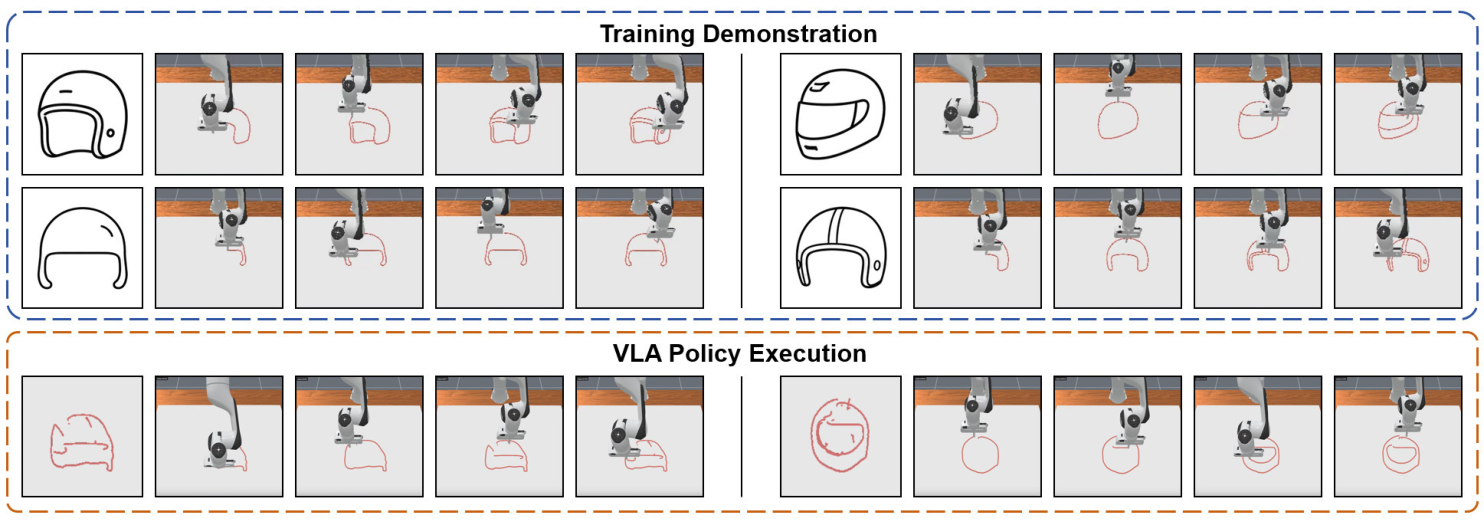
On more varied tasks, π0.5 also learns to produce different drawings for the same instruction. The helmet examples below compare training demonstrations with learned policy executions.
1 Tsinghua University 2 Shanghai Qizhi Institute
Announcement link coming soon
How effectively can VLA models learn diverse behaviors as training data scales? Answering this requires large, varied robot datasets, which remain costly to collect on physical robots. We propose to study this question through drawing.
A robot starts from a blank canvas and follows a language instruction, yet each instruction allows many valid drawings and stroke orders. This makes the data naturally multimodal, while compositions of familiar objects let us test spatial understanding and generalization to new combinations.
Text-to-image models supply the sketches that our pipeline converts into robot demonstrations, while learned visual features let us evaluate the resulting drawings. Together, these make drawing an ideal setting for studying how vision-language-action models learn as demonstrations scale—and where their execution breaks down.
The same drawing instruction admits different shapes, stroke orders, and execution routes. These four comparisons show the resulting diversity in BURGER alongside manipulation demonstrations from LIBERO.
Across 40 sampled instructions per dataset, BURGER averages 7.13 effective trajectory modes, compared with 1.09 in LIBERO. The four examples above show how this variation appears in demonstrations and learned behavior.
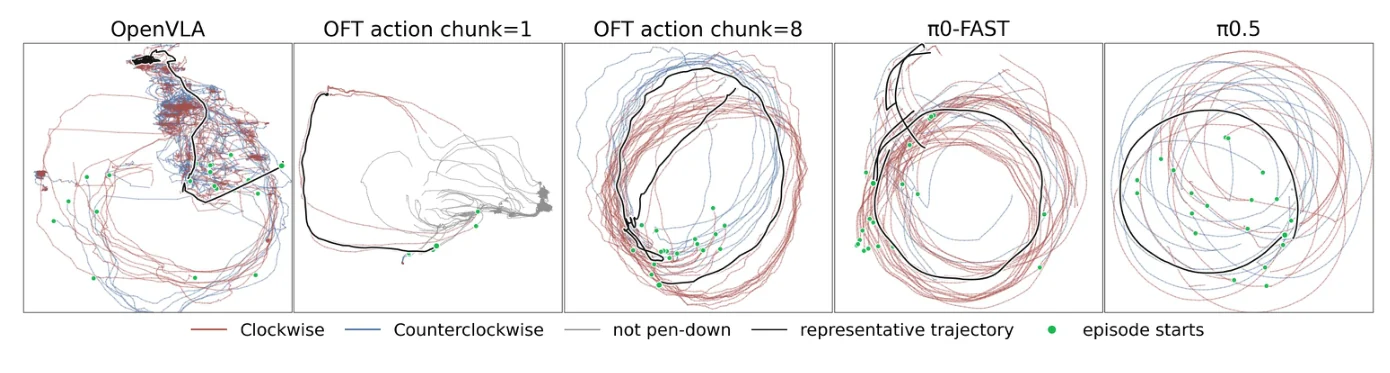
A circle can be drawn clockwise or counterclockwise. We train on 100 demonstrations with the same shape and radius, using both directions in roughly equal proportions (56% clockwise, 44% counterclockwise). Position and starting point also vary. Can a VLA learn these alternatives and execute one consistently?
Learned policies in simulation, shown at 3× speed. One example per setting; the measurements use 20 rollouts for each setting.
Execution changes with action chunking. OpenVLA-OFT makes contact in 6/20 rollouts at chunk length 1 and 20/20 at length 8.
Does the policy preserve both directions? π0-FAST draws clockwise in 95% of rollouts, compared with 56% of demonstrations. It also continues beyond a single revolution.
The same task exposes differences in contact, progress, termination, and coverage of the demonstrated behaviors. Inspecting the drawing process lets us distinguish these failure patterns.
| Source | Contact | Clockwise | Start entropy | Mean sweep |
|---|---|---|---|---|
| Demonstrations | 100/100 | 56% | 0.97 | 359.8° |
| OpenVLA | 20/20 | 40% | 0.82 | 874.6° |
| OFT · chunk 1 | 6/20 | 100% | 0.35 | 129.3° |
| OFT · chunk 8 | 20/20 | 55% | 0.58 | 586.1° |
| π0-FAST | 20/20 | 95% | 0.63 | 563.2° |
| π0.5 | 20/20 | 55% | 0.84 | 355.2° |
Clockwise percentages use rollouts that make contact. Higher start entropy indicates more uniform starting points; a sweep near 360° indicates a single revolution.
On more varied tasks, π0.5 also learns to produce different drawings for the same instruction. The helmet examples below compare training demonstrations with learned policy executions.
The initial blank canvas does not reveal which object to draw. The instruction specifies the object and, for a composition, its spatial relation to another object. As the drawing develops, the policy uses the changing canvas as visual feedback.
We also ask whether a policy can combine familiar objects in pairs absent from training. The examples below show π0 executing a seen pair and a held-out pair.
Draw a leaf left of a moon.
Draw an apple left of a blueberry.
Selected learned-policy rollouts in simulation. Both objects in the held-out pair are familiar from training.
The evaluated policies can produce new combinations of familiar objects, while object categories absent from training remain difficult. Composition can also reduce drawing quality, especially when the instruction set includes vertical relations.
The generation pipeline lets us vary the number of object classes from 10 to 132 and demonstrations per class from 10 to 100. We use this sweep to study how three OpenPI-family models respond to additional data: the flow-matching models π₀ and π₀.₅, and the autoregressive π₀-FAST.
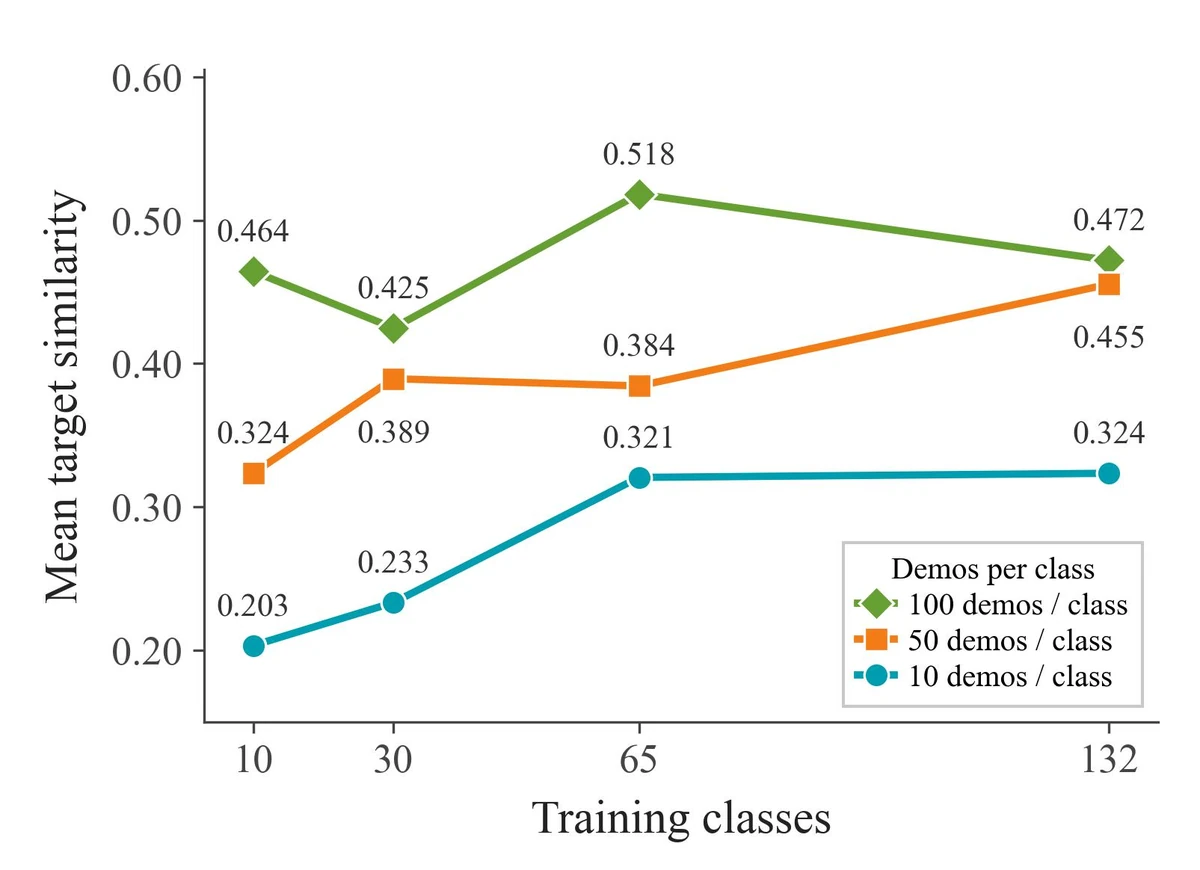
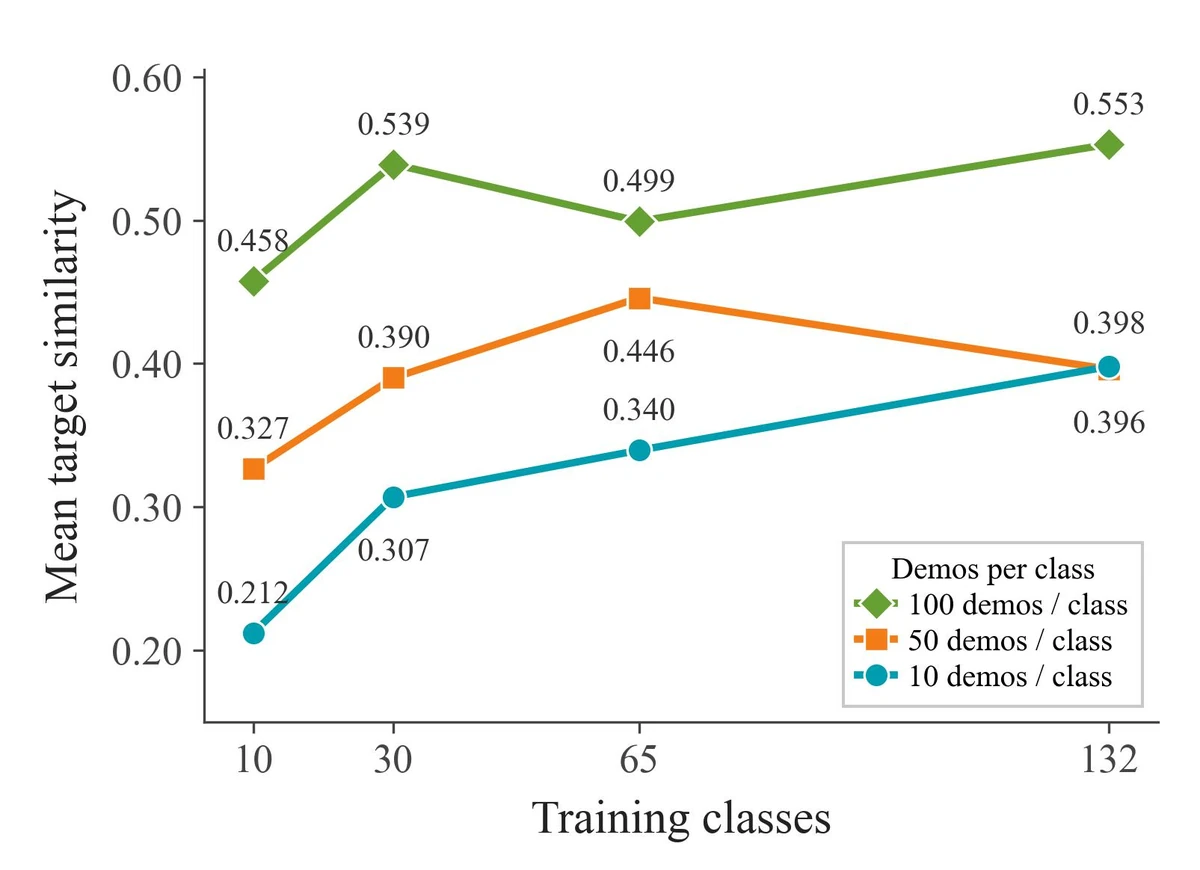
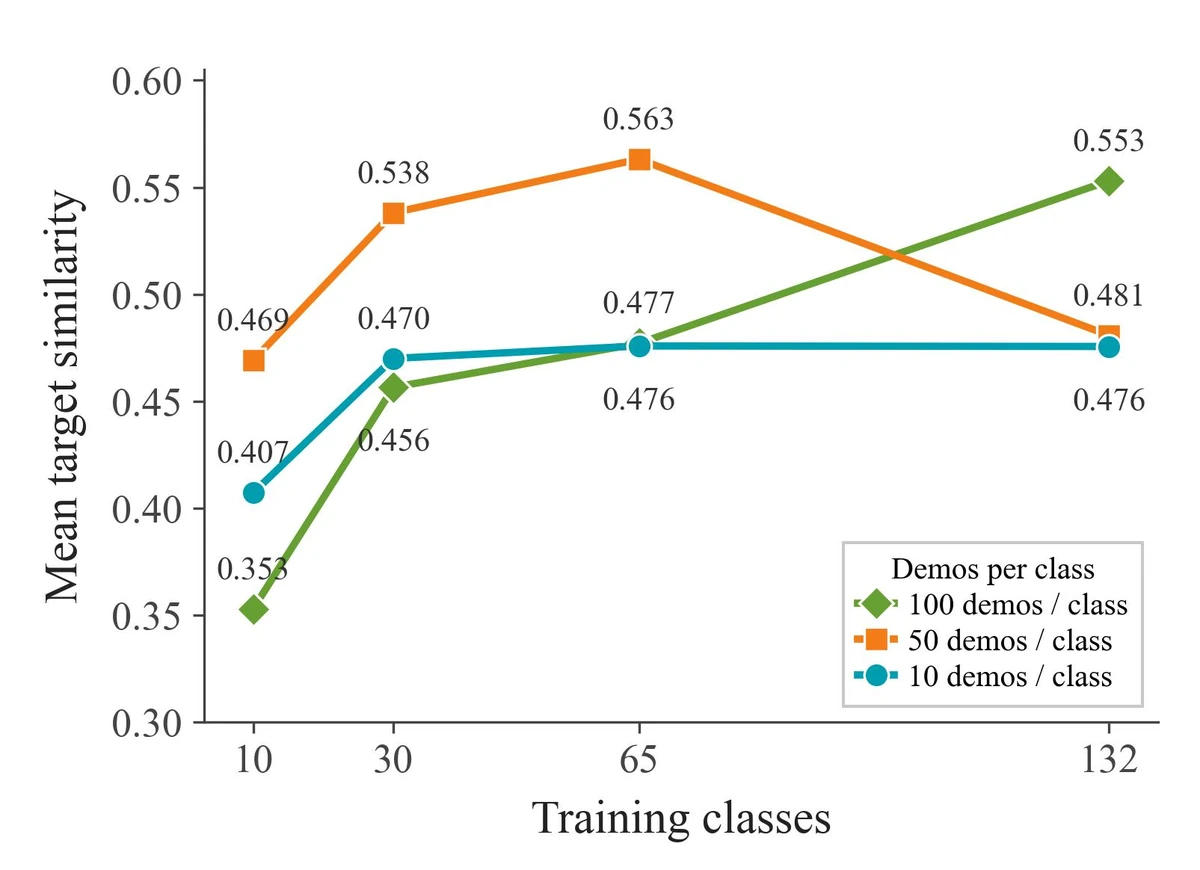
Drawing similarity across numbers of training classes and demonstrations per class. Higher scores indicate greater similarity to the target object class in the learned sketch embedding.
π0 and π0.5 improve more consistently as data scale increases. π0-FAST shows more variable trends. The models differ in how effectively they use additional drawing demonstrations.
The demonstration generator provides a way to vary task diversity and examples per task within one robot setup, supporting further studies of how training data shapes learned behavior.
We train a projection head on frozen DINOv3 features to score drawings against their target class. In a study of 10 single-object classes, 66 participants ranked five drawings per class. The metric agrees more closely with their judgments than CLIPScore.
| Metric | Spearman ρ | Kendall τb | Pairwise |
|---|---|---|---|
| CLIPScore | 0.592 | 0.433 | 0.803 |
| BURGER metric | 0.834 | 0.655 | 0.875 |
On a Franka Panda, fine-tuned π₀.₅ policies complete partial drawings and continue after a human edit. The experiments below use different training datasets, indicated with each result. These are selected qualitative examples.
In the bicycle experiment, the robot pauses while a person adds the rear wheel, then resumes from the updated canvas. The learned policy continues with the remaining structure.
π0.5 · 100 real demonstrations across 10 tasks.
“Draw a bicycle.” · 100 real demonstrations across 10 tasks.
“Draw an apple.” · 30 real demonstrations across 3 tasks.
We mix generated simulation demonstrations with a small real-robot dataset to fine-tune π0.5. These four objects appear in simulation training but are absent from the real-training set.
BURGER is designed to support studies of language-conditioned robot data. The dataset provides a starting point, and the generation pipeline lets researchers extend the task set and construct new training demonstrations.
The benchmark contains 28,200 simulated demonstrations: 132 single-object tasks and 150 compositional tasks, with 100 demonstrations per task. The compositional set contains 100 horizontal and 50 vertical tasks.
Consider “draw a helmet.” Both its shape and its stroke sequence can vary. A drawing dataset contains variation within each instruction as well as across categories.
Each pair draws the same helmet with a different stroke order, direction, and starting point. Generated in simulation · 3× speed.
32 category previews · 132 categories in the full dataset
Demonstration previews coming soon.
Scroll to browse generated demonstrations, replayed in simulation.
Explore 18 tasks with three recorded demonstrations each. The inside / contains examples illustrate additional generated tasks beyond the paper’s horizontal and vertical composition set.
Generated demonstrations recorded in simulation, shown at 6× speed with a final hold. These recordings show the generation pipeline’s output.
Start with a language prompt. The pipeline turns generated sketches into ordered strokes, then records the robot executing them—providing a scalable source of robot demonstrations for new objects and spatial compositions.
Draw a bicycle.

Use a text-to-image model, or supply a sketch.
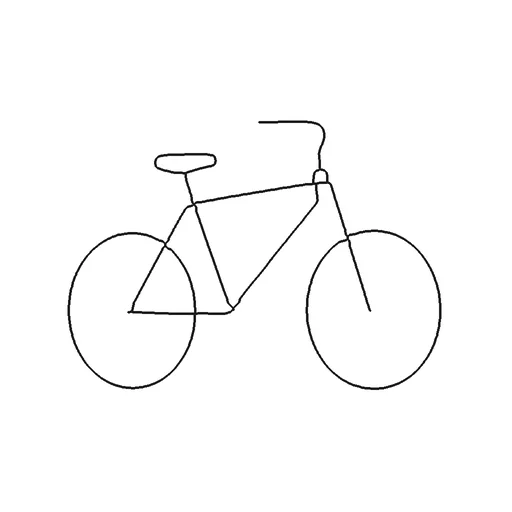
Extract the lines and choose a sequence for drawing them.
Follow the strokes while recording observations and actions.
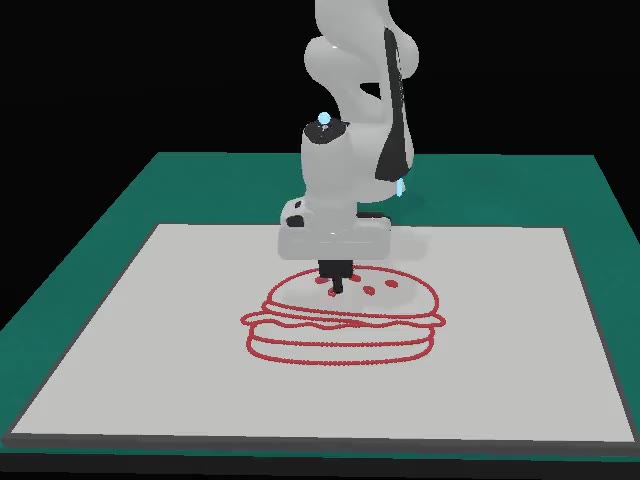
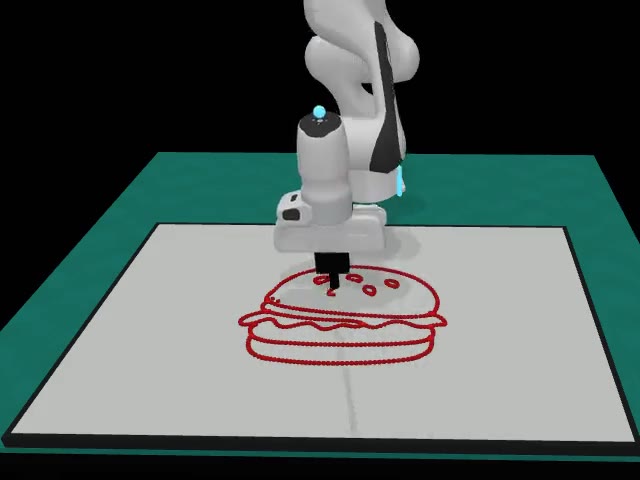
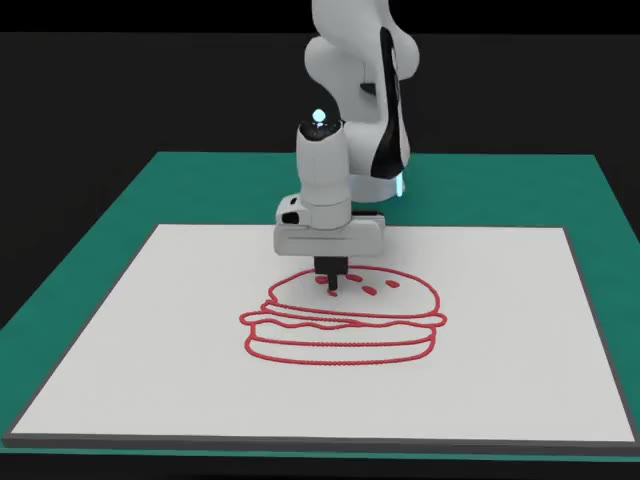
Each demonstration contains RGB observations, robot state, actions, and its language instruction.
Export datasets in LIBERO or LeRobot format.
Narrated overview · 2:52
BURGER studies line drawing with a rigid tool. It simplifies the contact physics of painting and manipulation. Generated sketches and stroke-order heuristics shape the data distribution.
The evaluated policies can compose known objects, but struggle to draw unseen object categories. Drawing performance does not establish general manipulation ability.
@misc{xu2026burger,
  title = {{BURGER}: Benchmarking and Understanding Robotic Generalization via Embodied dRawing},
  author = {Xu, Xiangyu and Peng, Bangshuai and Liu, Ziyi and Zhao, Mengjie and Lu, Chenhao and Fan, Zhengyang and Xu, Huazhe and Hu, Kaizhe},
  year = {2026},
  eprint = {2610.40532},
  archivePrefix = {arXiv},
  url = {https://arxiv.org/abs/2610.40532}
}